Posts

Showing posts with the label ubuntu

Setting up GitLab within Docker

Image
I'll be honest, I've been putting this off for quite some time & maybe that's been a good thing? Why would that be a statement to make? Well, because the complexity is now removed. not 100% but mostly. What am I on about?  Well, setting up a GitLab repository LOCALLY on your own machine / environment so you can do your own offline source control. Y'know, there are times you just don't want your code being pushed out to GitHub, even if you've made the repo's private & paid money, it still doesn't stop the owners (Micro$oft) from using your content / code to train their Machine Learning* models against your code - that will eventually put you out of a job as id1ots think that auto-generated code from Machine Learning* models is so good it will do that.  It won't, however, I don't particularly want to accelerate that level of dumb thinking. Answer = install GitHub  GitLab locally yourself. https://docs.gitlab.com/install/docker/ $ docker pul...

uConsole

Image
Yep, I ordered it back in January 2024, it finally arrived...just before December 2024.  Apparently the 10-month delay wasn't a joke, it really does take that long.  Was it worth the wait? Yeah, I reckon so. The 32Gb SDCard that came with the device, I just stuck it into the device - it was Debian 11 Bullseye for Raspberry Pi 4.  It worked okay, for a day or so. I installed [node-red], it worked well, I downloaded [world-map] and got some markers appearing, it seemed to perform well.  I then started to think how I want to set this device up to use it.  I wanted [Arduino] too. That 4G adaptor - how do you get it to work? (using the Debian Bullseye install) Well, after putting in a SIM card, the instructions in this article worked a treat: https://github-wiki-see.page/m/clockworkpi/uConsole/wiki/How-to-use-the-4G-extension To summarise: $ uconsole--4g-cm4 enable This outputs that it is detecting the adaptor and then it says something like "success". Then what? Wel...

Fabric Framework - Augment yourself

Image
https://github.com/danielmiessler/fabric "Fabric is an open-source framework for augmenting humans using AI. It provides a modular framework for solving specific problems using a crowdsourced set of AI prompts that can be used anywhere." "So what?" Well, if you've gone beyond the "hey, I can setup and access an LLM and now I'm a genius" phase, you will have hit the valley of disillusionment (is that even a word?), decided that LLMs are crap, attempted to do "stuff" with them & then mentally accepted that they are not smart at all, it's all an illusion to "appear to be intelligent", but really it's just word pattern matching and spewing out garbage in response to your questions, or just plain bollox. Then you thought, "hmmm... I'm going to write myself some prompts, that'll make life better", then you wrote about 5 very long and convoluted one's that you think are great & will be used for pre...

ROS2 on UBuntu 24 and a UGV Rover [FAIL] ~[SUCCESS] ?

Image
A UGV Rover 6-wheeled robot with Raspberry Pi5, awesome camera (pan & tilt / stabilisation) and a LiDar - what's not to like?  Well, it's open-source too. However, it comes with a bit of an odd setup, it is running a Raspberry Pi 5 board, but to control the device itself it's also running an ESP32 board that controls all the components. OOTB the setup is "okay", it's a web-browser based access to all the bits you need, it even has the concept of a jupyter notebook style Python setup that allows you to control / access all the features.  Although, this soon becomes a bit limiting. I hooked up a mini-HDMI to the Raspberry Pi 5 and it booked to Bookworm (12, I believe), which allowed me to then install things natively, I installed YOLO and got some really good camera / vision analysis going on. However, I then had the addition of the LiDar D500 attachment .   Now, this is where the "fun" started.  The lidar component came with links to a Windows .e...

Vanlife & Meshtastic

Image
Well, it's been a while since my last post.  Have I been up to anything technical? Yes & No. I've returned to the world of campervans! My previous motorhome (Kontiki 635) was stolen back at the end of April 2024 :-(  After a reasonably painless insurance claim process & lots of UK Police time, the motorhome was "found", however, it had been crashed / trashed - so was a write-off. I wasn't looking for another one, however, I then just happened to stumble upon a 2008 VW Crafter Campervan that ticked a LOT of boxes.  It was a professional conversion, it had a full size shower and a proper thetford cartridge toilet.  It had a king-size bed.  It has central heating - yes, the previous one had central heating, but that was a £65k van, this one was £16k! It has a solar panel, leisure battery and all connected up & working okay. It has a great layout inside, someone previously really thought about the design.  I'm the 4th owner and it's done 145k mile...

NVMe 256GB SDD on the RPi5 & ramping up the swapfile size (as you do)

Image
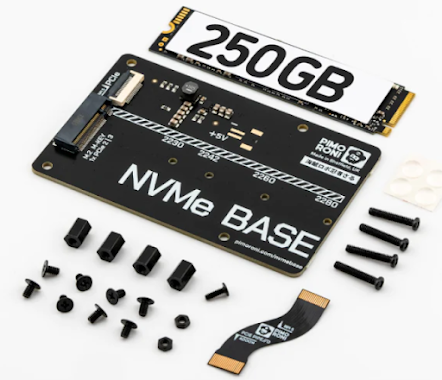
I purchased a couple of the great Pimoroni NVMe Base boards , one I bought with the supplied 256Gb SSD (fitted it to the RPi5 8Gb machine), where I promptly broke the connector on the board for plugging it into the RPi5... so I ordered another base unit without the SSD drive - then purchased a cheap FikWot FN501 Pro 256Gb from Amazon and took a gamble.  I set that board up on the RPi5 4Gb machine.  Just to be clear, it was a faff & was a bit hit & miss.  why? Well, I believe I had to install the Bookworm Raspberry Pi OS onto an SD-Card, go through all of that, then make the tweaks to the /boot/firmware/config.txt file, upgrade the RPi5 eeprom to the latest version, etc.. and then run Raspi Imager to flash the SSD drive once it was detected.  This would have been simple had the SDCard I used not been a little "unstable" :-) It did work for the 8Gb RPi5 and all was good - after completion, the machine boots from the SSD into the latest UBuntu.  awesome, e...