Posts

Showing posts with the label T1ll13

T1ll13 robot step 2.2

Image
very minor update, but great fun along the way.... As previous shared, I setup an RPi3 with ROS and was about to move into the coding of ROS nodes .  Whilst that was okay...it involved me having to use Python and whilst I see it's really useful to use, it's not my native tongue.  That is JavaScript...has been client & server-side since about 1998, so it's my go-to comfort first choice. So rather than attempting to port everything in my head into Python and then into ROS nodes, I thought I would do what I needed to do: "to get it to work" and then I'd look at porting it over. What did that require?  Well, installing NodeJS and npm on the RPi3 for one.  Dead easy and simple to do. Oh, I forgot to say what it is/was I wanted to actually achieve!  okay, I want to be able to SHOUT at T1ll13 and for her to always be listening via a microphone ( no trigger "Alexa" or "Google" words for me ), to convert that Speech to Text, then s...
NAO robot and IBM Watson services

Image
You know I like Robots. You know I like IBM Watson API services. Checkout how to get those 2 working together - there's a full description of everything needed in the github repo readme.md CHECKOUT THE GITHUB REPO (now) (watch the YoutTube replay of the Live cast HERE ) I'm going to take this as a baseline and instead of using the NAO, I'm going to use my T1ll13 robot-head. oh, btw - I've made some really good 3D printing success and building - roll on the weekend when I can get those web-cam eyes hooked up and working too!  

3D Printing is making some 2018 progress

Image
T1ll13 is starting to manifest into reality...... (btw - those are nose supports that I need to hack off with my dremel!) Now, just on a mission to print out all the internal parts to make up the mechanisms for the movements to happen..... ..and yes, it's all in PLA as that is what works for me and this printer.  ABS is just a waste of time and effort at the moment, it rarely sticks to the bed (been through the rounds of increasing bed temp) and when it does, after a few cm's it starts to split...so I decided rather than messing around, I'll just do it initially all in PLA and then come back and print again in ABS - probably once I've got myself a glass bed in place (or a different 3D printer!) I think we might be 3D printing for a few more weeks yet...as there are 10-13 parts needed for the skull and then..and then....and then.... you get the idea :-)

T1ll13 robot step 2.1

Image
Whilst I await on a very slow delivery of a 3D Printer ( yes, I decided to go ahead and buy one and give it a go ), I decided to switch back to the software side of things. I decided that I need to do some work with the XBox Kinect and ROS. After a bit of googling around, I see that as I've decided to use the ROS "kinetic" version and not the "Indigo" version that everyone else has previously used ( that's the older version, btw ), I'd be figuring this out for myself and who knows, I might even help some other people out along the way. I got a bit distracted and it looked like I needed to setup the robot simulator software Apparently I need to install MoveIt! - so, time to fire up the Raspi3, drop to a Terminal and type: $ sudo apt-get install ros-kinetic-moveit $ source /opt/ros/kinetic/setup.bash ( and then !boom! 2hrs of power-cuts just hit my area, probably something to do with the snow, etc... ) http://docs.ros.org/kinetic/api/mov...

T1ll13 robot step 2

Image
As explained here:   http://www.cs.bham.ac.uk/internal/courses/int-robot/2015/notes/concepts.php ROS is a  message-passing  framework which allows you to create fully-fledged robotic systems quickly and easily. Rather than writing a single, large program to control the robot, we run a number of smaller, process-specific programs ( e.g. to analyse images from a camera ) and run them side-by-side, passing messages between them to share data and other variables. The core component in ROS is called a Node: Each Node performs a particular process, such as processing sensor data or controlling a laser scanner. You can think of them as code modules. However, rather than calling a Java method to get the robot to do something, we  publish messages . Messages are published on topics , which are like separate channels.  Nodes subscribe  to these topics: Whilst one Node publishes messages on a certain topic ( for example, robot movement commands ...

Saturday status

Image
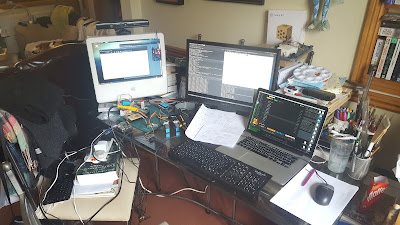
Making some great progress with ROS , RPi3, PCA9685 and a couple of HK 15298s and some Python code... (and yes, Jelena is just "resting" in the background) I'll write-up the notes from the center of the desk a little later.  Small steps, but certainly moving in the right direction!

T1ll13 robot step1

Image
After a couple of long nights, a lack of appetite and a fair amount of headaches, I finally have something meaningful setup as a framework/platform to build on for the new robot called T1ll13 - it's a new (Millennial) species, so it needs a new type of naming structure. (It's short for Matilda) (this is not T1ll13 - just a stock photo) I originally went the RPi3 route of installing Raspbian/Jessie and then attempting to build upwards from there to install the ROS, as explained here: http://wiki.ros.org/ROSberryPi/Installing%20ROS%20Kinetic%20on%20the%20Raspberry%20Pi All would seem to work okay, until it got to the rosbag install and it would fail, with no sensible way of recovering....trust me, I tried. I even went backwards a version to the Indigo, but still had no joy: http://wiki.ros.org/ROSberryPi/Installing%20ROS%20Indigo%20on%20Raspberry%20Pi ....that just gave me issues at another point further down the line. Not being one to admit defeat, I adopted my ...